Daily check-in
A check-in may require consecutive days or another action. Read the current sequence rules.
Promotions and check-ins
The supplied Promo screen shows Event, Mission, VIP, Rebate and Unclaimed tabs, plus turntable, redemption-code and daily check-in cards.
999HA daily rewards are shown through the Promo area in the supplied interface. The screen includes Event, Mission, VIP, Rebate and Unclaimed tabs, plus cards for a lucky turntable, redemption codes and daily check-ins. A visible card explains where an offer can be opened; it does not prove that every account receives the same reward.
Open the current promotion and read eligibility, start and expiry dates, required activity, reward type and claim method. Some 999HA events may depend on consecutive check-ins, eligible games, referrals, deposits or a limited period. Do not spend beyond your budget simply to avoid losing a bonus.
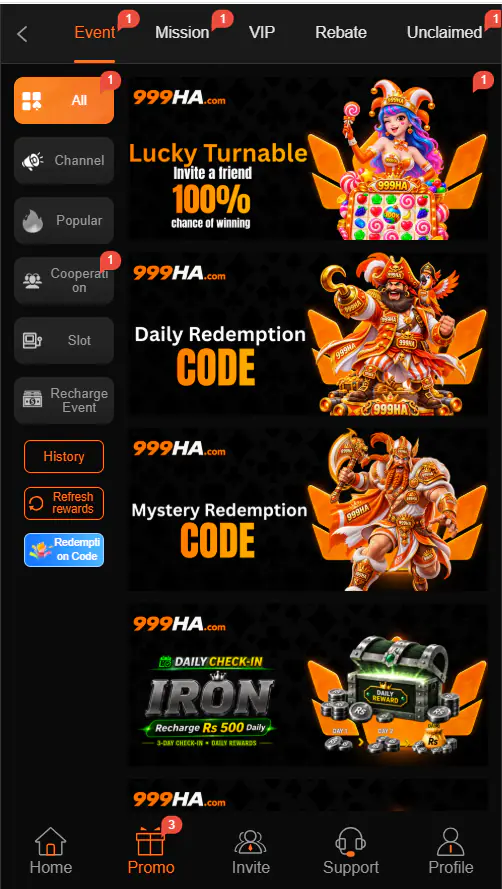
Choose the relevant Promo tab, open the current card and read every condition before completing an action. Confirm whether the result is cash, bonus balance, points or a coupon. If a redemption code is offered, enter it only in the official code area and check spelling, capitalization, expiry and account eligibility.
A reward can include turnover, game, expiry or withdrawal conditions. Read those rules before depositing or playing. The 999HA deposit guide explains how to check a bonus before payment, while the 999HA withdrawal guide covers a lower withdrawable balance or pending request. Promotions should never be treated as guaranteed income.
Save the offer name, rules, claim screen, date and account-history status. Check whether the action was completed within the correct event period. Then use verified in-app support with those records. A legitimate support agent should not need your password, OTP or wallet PIN. For account-access problems, use the 999HA login guide.
Read the answer to each question on the current event page. If an important term is missing or unclear, do not assume the most favourable meaning. Save the rules before starting because an offer screen can change after the event ends.
A daily check-in may depend on consecutive days, while a mission can require a specific activity. A redemption code may be limited by account, region, usage count or expiry. A rebate may be calculated after qualifying activity rather than appearing immediately. Identifying the reward type prevents confusion when checking account history.
If the claim button is unavailable, check the event clock, eligibility and whether today’s action has already been recorded. If a code fails, review capitalization and expiry before contacting support. Do not buy a “special code” from a private seller or send money to receive a supposedly free reward.
Plan promotions around a fixed entertainment budget rather than changing the budget to satisfy a mission. 999HA daily rewards should be considered optional account features, not wages or guaranteed value. If completing an event requires more spending or play than expected, let the offer expire. A missed reward costs less than continuing beyond a personal time or money limit.
Check the Unclaimed and account-history areas after an event ends. Record the final status before opening another ticket so support can distinguish a missing reward from one that has already been credited.
999HA daily rewards can change without notice and may vary between accounts. Always rely on the live event page rather than an old screenshot. Real-money gaming carries financial risk, and a bonus does not make uncertain results predictable.
Start here
A card is not proof that every user receives the same amount. Reward names, values and conditions can change.
A check-in may require consecutive days or another action. Read the current sequence rules.
Offers may depend on activity, eligible games, deposits, referrals or a limited period.
Codes can have expiry, usage or account restrictions. Use only the official redemption area.
Step by step
Review the rules before completing the promotional activity.
Choose Event, Mission, VIP, Rebate or Unclaimed as appropriate.
Open the check-in, event, code or mission shown in your account.
Check eligibility, expiry, required activity, value and turnover.
Do not spend beyond your budget to qualify.
Never send an OTP, password or payment to receive a reward.
Confirm whether it is cash, bonus balance, points or a coupon.
Before you continue
A visible reward can still have conditions that affect its use.
Troubleshooting
Identify the likely cause first, then use only the verified support path.
Promotions can include spending or turnover conditions. Do not keep playing only to avoid losing a reward.
Frequently asked questions
That was not confirmed. Availability depends on the account and current event.
The supplied screenshot shows promotional cards inside the Promo area.
Yes. Some offers include turnover, eligible-game or expiry conditions.
Save the offer name, date, claim status and account-history screenshots.
Use current information