Available method
Use only a method visible in the current Deposit screen, not details copied from an old post or message.
Wallet funding guide
The supplied home screen shows a Deposit shortcut near the balance. This page explains how to check the live wallet, follow current instructions and keep proof of payment.
A 999HA deposit should be made only from the Deposit screen inside your own verified account. The supplied home screen shows a Deposit shortcut near the balance, but it does not prove a permanent minimum, maximum, fee or receiver. Open the live wallet every time because the available method and payment instruction can change by account, date or app version.
JazzCash and Easypaisa may be useful options for Pakistani users when they are displayed in the current wallet. Do not assume that a method mentioned in an older guide is still active. Compare the receiver name, mobile number or account details immediately before sending. If anything differs from the instruction on screen, pause the payment and use verified support.
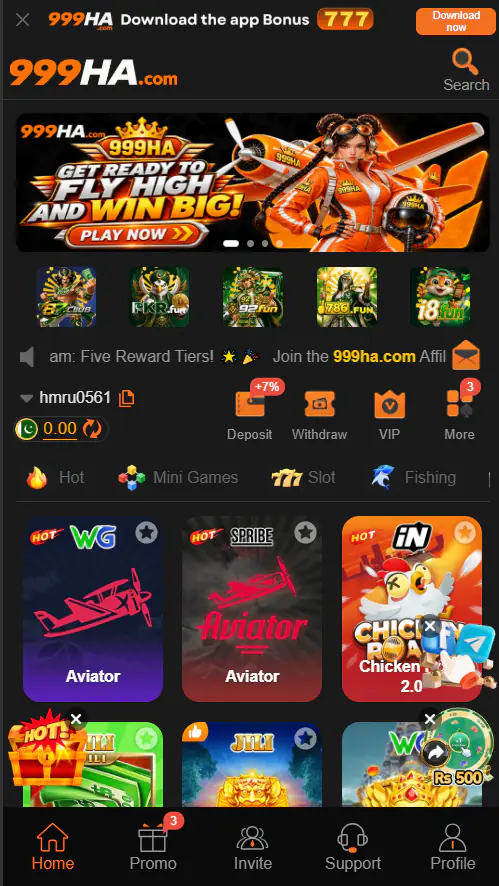
Confirm the account ID, current minimum and maximum, possible fee and the exact amount. Open the full terms if a bonus is selected, because a reward can add turnover, eligible-game or withdrawal conditions. Use only money you can afford to lose. A 999HA deposit is payment for real-money play, not an investment and not a promise of profit.
Save the provider receipt, transaction ID, amount and time until the 999HA balance updates. If the balance remains unchanged, check the original transaction status before paying again. Repeated payments can create a second problem. Contact only the support option shown inside the verified platform and provide the reference—not a password, OTP or wallet PIN.
If a payment option disappears or shows maintenance, do not reuse old receiver details. A temporary method change can make an earlier instruction invalid. Wait for the wallet to display an available option or ask verified support when it is expected to return.
Keep the account ID, provider name, paid amount, transaction reference, date, time and current provider status. A screenshot can help, but hide unrelated wallet information before sharing it. Never publish a receipt publicly because it can expose identifiers that a scammer may misuse.
If the provider marks the transaction failed or reversed, follow the provider’s status first. If it shows successful while the game balance is unchanged, use the platform’s verified support with the saved reference. Do not create several tickets or repeat the same transfer while the first case is being checked.
Set a payment budget before opening the wallet and keep that limit separate from household expenses. A 999HA deposit should never be funded with borrowed money or by chasing an earlier loss. If a bonus encourages a larger amount than planned, skip the offer or use the original budget. The safest deposit is one whose amount, recipient, terms and proof have all been checked before the final payment.
Make sure you can access the account before sending money by following the 999HA login guide. Read the 999HA withdrawal guide before accepting a promotion, and review the daily rewards guide for bonus conditions. These pages explain what evidence to save and which live details must be checked.
Payment availability and processing speed cannot be guaranteed by this guide. Network conditions, wallet-provider status and account review can affect completion time. If the instruction asks you to pay a private “agent” or promises guaranteed winnings, do not continue.
Start here
Methods and limits can change by account, time or app version. Confirm JazzCash, Easypaisa or any other method inside your current wallet.
Use only a method visible in the current Deposit screen, not details copied from an old post or message.
Read the live minimum, maximum and possible fee before payment.
A deposit offer may add turnover or withdrawal conditions. Open the full rules first.
Step by step
The exact buttons can change, but these checks remain useful.
Confirm the account ID and balance before opening the wallet.
Use the shortcut inside your account, not a link sent by an unknown person.
Read its present limits, charges and instructions.
A deposit is not an investment and does not guarantee a return.
Compare the name, number or account details immediately before paying.
Keep the receipt, time, amount and reference until the balance updates.
Before you continue
Review these items while the payment screen is open.
Troubleshooting
Identify the likely cause first, then use only the verified support path.
A legitimate deposit should follow the instruction visible inside the current wallet. Guaranteed-profit promises are a warning sign.
Frequently asked questions
Check the current Deposit screen because available methods can change.
Use the amount displayed on the live wallet; no fixed minimum was independently verified.
Processing depends on the method, network, provider and account review.
No. Check the first payment and contact verified support before repeating it.
Use current information